Emailing a lead and checking campaigns on your phone
Send one email to a lead from your phone, using a saved message or your own words, and see how your campaigns are doing.
On this page
Sending an email
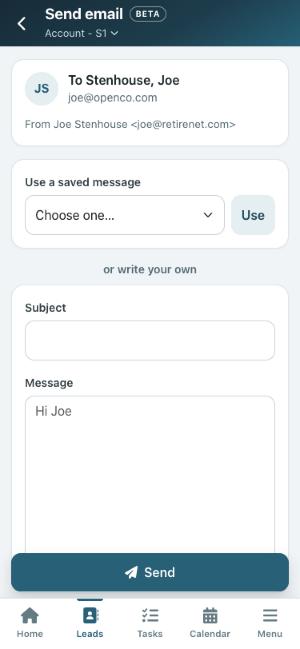
On a lead’s page, tap Email. It goes from your own address, the same as on the computer.
- Load from Library: pick one from your message library and tap Load; the lead’s details are filled in.
- Or write your own: type a subject and a message.
Tap Send now. The email is added to the lead’s history.
If the lead has no email address, has opted out, or their address is bouncing, Open Leads tells you and the email is not sent.
Campaigns
Open More > Campaigns to see your email campaigns with how many were sent, opened and clicked, and how many bounced. Tap a campaign for its details: the most-clicked links, and lists of who clicked, who opened and who bounced (with the reason). Tap a name to open that lead.
Who it is from
The From line shows who the email comes from and how it will be delivered: Domain (your own verified domain), Gmail, Outlook or Default. If your account has a verified domain, new emails start on it.
- Tap the From line to change it.
- To send from your domain, type the part before the @ and pick the domain, then tap Use this address.
- To go back, tap Use my Gmail (or Outlook) when it is connected, or Use the default sender.
The Message Library and call scripts
Open Menu and find it under Marketing (on the older menu it is More > Messages Library). The Messages tab lists your messages by category; Call Scripts lists your call scripts.
- Tap a message to see it. You can change its name, subject, category and, for messages written in the classic editor, its content, with bold, lists, links and tokens. Messages built in the Message Builder show as a preview.
- Tap a call script to read it or change it. Tap Preview to see it with your own details filled in.
- Tap + to Add Message, Add Call Script or add a New Category. Copy and Delete are at the bottom of each one.
- Under Manage Only My Messages you see everything but can change only what you made.