The mobile Home screen
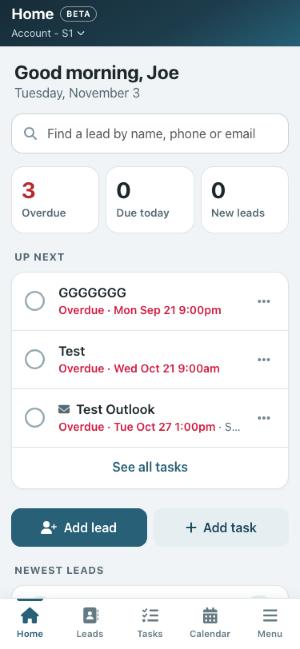
The Home screen shows what is overdue, what is due today, your new leads, and quick buttons to add a lead or a task.
On this page
Your day at a glance
Home is the first screen you see on your phone. From top to bottom it shows:
- A search box. Type a name, phone number or email to find someone fast.
- Three counts. Overdue tasks, tasks due today, and new leads assigned to you that you have not opened yet. Tap a count to go straight to that list.
- Up next. Your overdue tasks and today’s tasks, soonest first. Tap the circle to complete one, tap the task to open its lead, or tap … to edit or reschedule it.
- Add lead and Add task buttons.
- Newest leads assigned to you, with a call button beside each one.
Tip: Marking a task done from Home works exactly like the computer: if the task asks a Yes/No question, or your account asks for a comment, Open Leads asks for it before it is marked done.